
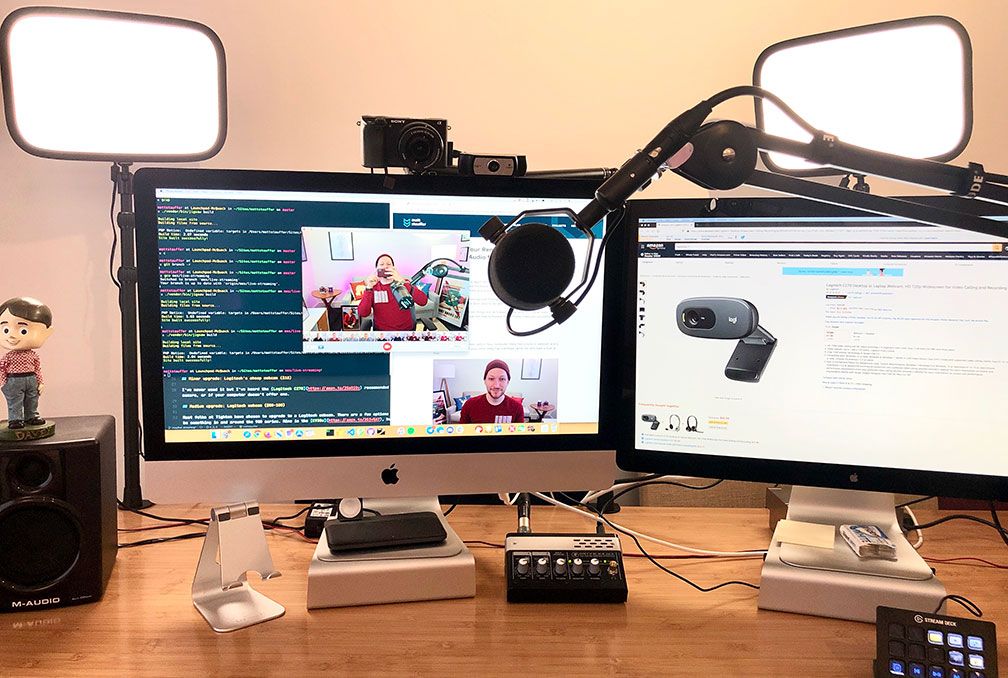
Build a Pro Work-from-Home Setup, The remote work revolution has officially transformed from a temporary trend into a permanent lifestyle. Millions of global professionals now design their daily careers entirely from the comfort of their own homes.
However, typing on a kitchen counter or slouching on a living room couch quickly destroys your physical health. A chaotic environment decreases your professional output and causes severe physical fatigue over time.
Investing in a highly professional dedicated workspace is essential for your long-term career success. A well-designed office setup isolates external distractions and triggers deep mental focus instantly. It creates a physical boundary between your personal domestic life and your strict professional responsibilities. Let us explore how to construct the ultimate executive-level home office to supercharge your career.
Choosing the Perfect Office Location
Selecting the right physical area within your household lays the foundation for a highly productive workday. Avoid high-traffic communal zones like the family kitchen or the main living room if possible. These bustling areas present continuous visual and auditory interruptions that shatter your creative concentration. A quiet spare bedroom or a secluded basement corner serves as an ideal workspace location.
What if your current living arrangement lacks an entirely separate, empty room for an office? You can still carve out a highly efficient workspace using clever interior design techniques. Place a compact desk against a quiet bedroom wall or inside a deep, unused closet space. Use tall bookcases or acoustic room divider panels to isolate your desk area visually.
Furthermore, pay close attention to the proximity of your household wireless internet router before finalizing your layout. A weak, unstable network connection will ruin important video conference pitches and delay large file uploads. If you sit far away from the main router, consider running a dedicated Ethernet cable. This physical connection ensures maximum data transmission speeds and total network stability throughout your shift.

Prioritizing Advanced Ergonomic Furniture
Remote professionals spend thousands of hours sitting at their office desks every single year. Using cheap, non-adjustable furniture inevitably leads to debilitating chronic back pain and repetitive strain injuries. Therefore, prioritizing premium ergonomic design is the most critical health decision you can make. High-quality corporate furniture actively protects your skeletal structure and sustains your physical energy levels.
The Ergonomic Office Chair
Your office chair represents the absolute most important component of your entire workspace setup. Avoid trendy gaming chairs or basic plastic task seats that lack adjustable support structures. Look for a premium ergonomic chair featuring robust, customizable lumbar support that matches your spinal curvature. The armrests should adjust in multiple directions to keep your shoulders perfectly relaxed.
In addition, a high-quality mesh material allows for excellent airflow to keep you cool during intense summer afternoons. You must be able to adjust the seat depth to prevent pressure behind your knees. Your feet should always rest flat on the floor to maintain proper circulatory blood flow. Investing in an elite chair completely eliminates the physical aches typically associated with long desk shifts.
The Smart Standing Desk
Pairing a great chair with a motorized adjustable standing desk unlocks the ultimate ergonomic workflow layout. Sitting in a static position for eight hours straight slows down your metabolic rate and causes muscle tightness. A smart standing desk allows you to transition between sitting and standing smoothly throughout the day. Look for a dual-motor system that operates quietly and handles heavy hardware setups easily.
Furthermore, program your preferred height configurations into the desk memory pad for quick, automated adjustments. You should stand for roughly fifteen minutes out of every working hour to boost full-body blood circulation. This simple movement patterns increase oxygen delivery to your brain, which elevates your afternoon focus levels. What’s interesting is how much crisper your voice sounds during presentations when you speak while standing.
Optimizing Display Technology and Monitor Layouts
Staring at a tiny, low-resolution laptop screen for hours causes severe digital eye strain and neck fatigue. Your head naturally tilts downward to read small text, which places massive structural pressure on your neck. Transitioning to an expansive external monitor array expands your digital real estate and keeps your posture upright. A professional display configuration allows you to view multiple documents simultaneously without constant window switching.
What’s interesting is the incredible productivity boost provided by modern ultra-wide productivity monitors. A single thirty-four-inch curved ultra-wide display can easily replace a messy dual-monitor configuration. It eliminates the annoying plastic bezels right in the center of your primary field of view. You can neatly arrange three full-sized application windows side-by-side for seamless reference workflows.
However, simply purchasing a large screen is not enough to ensure full ergonomic comfort. You must mount your displays onto an adjustable gas-spring monitor arm clamped to your desk. The absolute top edge of your monitor should align perfectly with your natural eye level. This precise height configuration prevents you from tilting your chin up or down during long reading sessions.
Professional Audio and Video Enhancements
Virtual meetings have completely replaced traditional corporate boardroom interactions in the modern remote workspace. Poor video quality and muffled microphone audio make you appear highly unprofessional to clients and corporate managers. You cannot rely on the low-quality webcam and internal microphone built into your laptop chassis. Upgrading your communication hardware ensures your virtual presence matches the high quality of your actual work.
In addition to crisp video, high-fidelity audio capture is paramount for conducting smooth remote business negotiations. Purchase a dedicated standalone USB condenser microphone equipped with a sturdy desktop boom arm. Position the microphone close to your mouth to eliminate ambient room echo and distracting background noises. Your colleagues will hear a rich, authoritative voice that sounds exactly like a professional radio broadcast.
Furthermore, proper lighting placement matters significantly more than buying an expensive, high-end camera lens. Never place your main workspace desk directly in front of a bright, open window. This layout creates a harsh silhouette effect that leaves your face completely dark on camera. Position a soft LED ring light or a desktop key light directly behind your webcam instead.
Perfecting Lighting and Environmental Control
The overall atmospheric condition of your home office directly impacts your psychological mood and energy levels. Harsh, flickering fluorescent lighting can trigger intense migraine headaches and accelerate mental exhaustion. Conversely, an excessively dim room strains your eyes and induces a state of physical sleepiness. Balancing natural light with optimized artificial illumination creates an inviting, highly energetic working environment.
What is fascinating is how significantly the color temperature of your office lighting affects human cognitive performance. Utilize crisp, cool white light during the morning hours to mimic natural daylight and suppress sleep hormones. This bright illumination triggers immediate alertness and helps you tackle complex analytical tasks efficiently. As evening approaches, transition your smart bulbs toward warmer, softer yellow tones to relax your mind.
Furthermore, maintaining a comfortable ambient room temperature prevents physical restlessness throughout your working shift. Air quality also plays a silent, critical role in sustaining your high level of cognitive brain function. Place a true HEPA air purifier near your desk to eliminate fine dust particles and allergens continuously. Adding a few live green plants introduces fresh oxygen and creates a beautiful, calming visual aesthetic.

Summary of the Professional Setup
Building a professional work-from-home setup is a powerful investment in your health and corporate career longevity. Isolating your workspace from domestic distractions allows you to access deep focus states rapidly every single morning. Premium ergonomic chairs and adjustable standing desks actively protect your body from painful long-term physical injuries. Expansive, high-resolution monitor layouts expand your cognitive bandwidth and streamline your complex software multitasking tasks.
Ultimately, high-quality audio and video communication tools ensure you project absolute competence during critical executive meetings. Controlling your surrounding environmental variables like temperature, air quality, and light color maximizes your daily output. Your home office should function as a highly customized engine designed explicitly to accelerate your professional growth. Take control of your workspace today and experience a magnificent transformation in your daily career fulfillment.
You may also like
-
The Fractured Mirror: How Tech Tips Reflect the Fragmented Self in a Digital Age
-
The Digital Sundial: How Tech Tips Mark the Hours of Our Inner Time
-
The Breath Between Clicks: How Tech Tips Become the Pause in Our Digital Pulse
-
The Digital Hearth: How Tech Tips Kindle the Warmth of Human Connection
-
The Alchemy of Attention: How Tech Tips Shape the Landscape of Our Minds